
How to Test LiFePO4 Battery Capacity: Load, Multimeter & Tester Guide (2026)
Table of Contents
- Introduction: Why Test Battery Capacity?
- Understanding LiFePO4 Battery Capacity
- Method 1: BMS State-of-Health Reading (Easiest)
- Method 2: Controlled Load Test (Most Accurate)
- Method 3: Multimeter + Clamp Meter Test
- Method 4: Dedicated LiFePO4 Capacity Tester
- Method 5: Charging Cycle Test
- How Often Should You Test Capacity?
- Signs Your Battery Needs Testing
- B2B Procurement Checklist
- Frequently Asked Questions
- Summary
How to Test LiFePO4 Battery Capacity: Load, Multimeter & Tester Guide (2026)
Last updated: October 2026 | Written by the Enerbe Engineering Team
Introduction: Why Test Battery Capacity?
Quick Answer: To test LiFePO4 battery capacity, fully charge the pack, apply a known constant-current load, time how long it takes to reach the cut-off voltage (10.0V for a 12V/4S pack), then calculate Capacity (Ah) = Current (A) × Time (h) and SoH (%) = Measured Ah ÷ Rated Ah × 100. A BMS State-of-Health reading is the quickest estimate, a controlled load test is the most accurate, a multimeter plus clamp meter works in the field, and a dedicated LiFePO4 battery capacity tester automates the whole measurement. A pack below 80% of rated capacity is at end of life.
For B2B buyers, fleet operators, and system integrators, battery capacity is a direct indicator of performance and return on investment. A pack that promised 100Ah but now delivers 80Ah quietly shrinks backup time, solar self-consumption and daily uptime.
Testing LiFePO4 battery capacity helps you:
- Track degradation — know exactly when to plan replacement, instead of guessing.
- Verify supplier claims — confirm the battery delivers the rated Ah or Wh you paid for.
- Plan maintenance — schedule replacements before a failure, not after one.
- Calculate ROI — know how much usable energy you are actually getting per cycle.
- Settle warranty claims — produce a documented capacity figure to back a claim.
For a complete overview of LiFePO4 sourcing across all applications, see our B2B Sourcing Guide.
Understanding LiFePO4 Battery Capacity
Battery capacity is the total amount of energy a battery can store, measured in amp-hours (Ah) or watt-hours (Wh); Wh = Ah × nominal voltage. A 12V 100Ah LiFePO4 pack stores about 1,280Wh (100Ah × 12.8V).
| Term | Definition | Example |
|---|---|---|
| Rated capacity | What the manufacturer claims at a specified current and 25°C | 100Ah |
| Usable capacity | What you can actually use over the chosen DoD window | 80–100Ah |
| Measured capacity | What a properly run load test shows today | 95Ah (95% SoH) |
| State of Health (SoH) | Measured capacity as a percentage of rated capacity | 95% |
The 80% rule: A LiFePO4 battery is considered at end of life when its measured capacity falls below 80% of rated capacity. A 100Ah battery testing at 75Ah should be replaced for demanding applications. Note that rated capacity is specified at a given current — testing at a much higher current will read lower, so always test at the current stated on the datasheet (commonly 0.5C or a named discharge rate) and at roughly 25°C.
For how capacity fades over years and cycles, see our LiFePO4 lifespan guide.
Method 1: BMS State-of-Health Reading (Easiest)
Most modern LiFePO4 batteries use a BMS that estimates State of Health from the charge it has counted going in and out. It is the fastest check but is only an estimate.
| BMS data | What it shows | How to access |
|---|---|---|
| State of Health (SoH) | Current capacity as % of rated | Bluetooth app, CAN bus, RS485, display |
| Total cycle count | Number of charge/discharge cycles logged | BMS internal log |
| Cell voltage spread | Imbalance between series cells | Monitoring software / app |
Steps: (1) connect with the manufacturer's app or monitoring software; (2) open the SoH reading; (3) SoH of 80% or higher is healthy; (4) below 80% means plan replacement.
Limit: BMS SoH is a coulomb-counting estimate that drifts if it is not reset by a full charge/discharge. For exact verification, use Method 2 or 4.
Method 2: Controlled Load Test (Most Accurate)
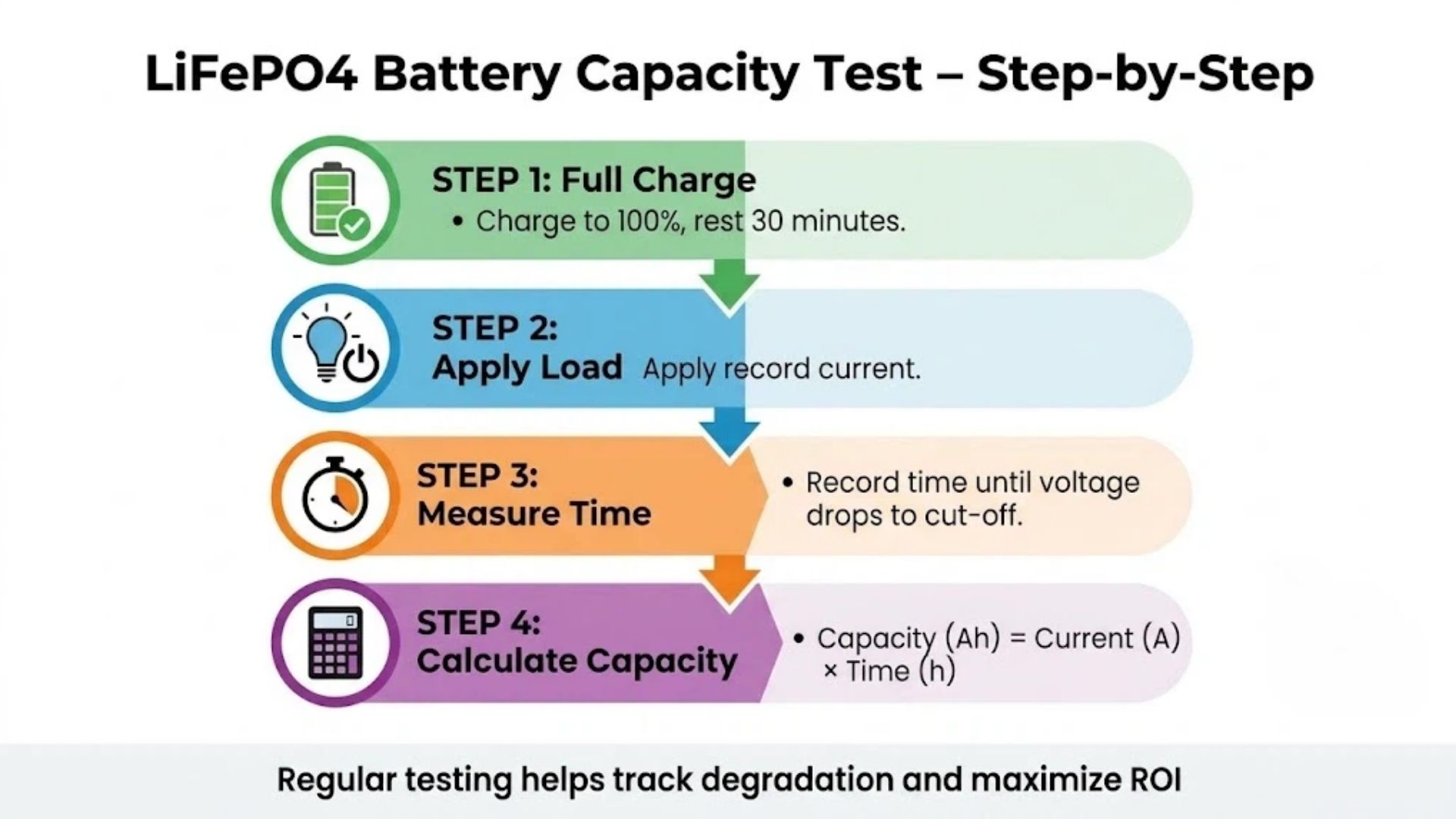
A controlled load test measures the energy the battery actually delivers, so it is the most accurate method and the one used for warranty evidence.
What you'll need
| Equipment | Purpose |
|---|---|
| Known constant load (or electronic load) | Resistive load, heater, inverter with steady load, or programmable DC load |
| Voltmeter / multimeter | Monitor voltage to the cut-off point |
| Clamp meter / ammeter | Measure actual discharge current in amps |
| Timer / stopwatch | Measure elapsed discharge time |
Step-by-step
- Full charge: charge to 100% with the correct LiFePO4 profile (14.6V for a 12V pack), then let it rest 30 minutes.
- Apply a constant load: connect a steady load and record the current (e.g. 20A). Keep it constant — a varying load invalidates simple math.
- Run to cut-off: start the timer and stop when voltage reaches the pack cut-off (typically 10.0V for a 12V/4S pack, 2.5V/cell; the BMS will usually cut first).
- Calculate capacity: Capacity (Ah) = Current (A) × Time (h). For Wh, multiply Ah by the average voltage (≈12.8V for 12V).
- Calculate SoH: SoH (%) = Measured Capacity ÷ Rated Capacity × 100.
| Parameter | Value |
|---|---|
| Rated capacity | 100Ah |
| Load current | 20A (0.2C) |
| Run time | 4.5 hours |
| Measured capacity | 20A × 4.5h = 90Ah |
| State of Health | (90 ÷ 100) × 100 = 90% SoH |
Result: 90% SoH is healthy but beginning to degrade. For the correct charge voltage and profile, see the LiFePO4 charging guide.
Method 3: Multimeter + Clamp Meter Test
People often ask how to test LiFePO4 battery capacity with a multimeter. A plain multimeter cannot read amp-hours directly, because capacity is energy delivered over time. It can, however, do two useful things: read open-circuit voltage for a rough state-of-charge estimate, and — combined with a clamp meter — run the same load test as Method 2.
3a. Open-circuit voltage as a rough SoC check
Let the battery rest for at least 30 minutes with no load or charger, then measure the terminals. The table below is for a 12V (4S) LiFePO4 pack.
| Resting voltage (12V pack) | Approx. SoC |
|---|---|
| 13.4V | 100% |
| 13.3V | ≈90% |
| 13.2V | ≈80% |
| 13.0V | ≈60% |
| 12.8V (nominal) | ≈50% |
| 12.4V | ≈30% |
| 12.0V | ≈20% |
| 11.6V | ≈10% |
| 10.0V | 0% (cut-off) |
Why voltage is only a rough guide: LiFePO4 has a very flat voltage plateau — across roughly 20–90% SoC the pack sits near 12.8–13.3V, changing by only a few tenths of a volt. A multimeter cannot tell 50% from 80% in that range. Voltage only becomes a reliable indicator near fully charged or nearly empty. It checks state of charge, not capacity or SoH.
3b. Multimeter + clamp meter load test (measures Ah)
- Fully charge the battery and let it rest.
- Connect a steady load, then clamp the meter around one main cable (not both + and − together) to read discharge current.
- Note the current (A), start a timer, and monitor terminal voltage with the multimeter.
- Stop at the cut-off voltage, note the hours, and compute Capacity (Ah) = A × h.
- If the current drifts, record readings every 15–30 minutes and sum A × Δt for each interval.
Method 4: Dedicated LiFePO4 Capacity Tester
A LiFePO4 battery capacity tester (programmable DC electronic load or an integrating battery analyzer) automates the load test: it holds a constant current, stops at the cut-off voltage, integrates amp-hours and watt-hours, and displays the result directly. This is the fastest accurate method and the standard choice for anyone testing many packs.
| Tester type | Best for | Key specs to check |
|---|---|---|
| Programmable DC electronic load | Technicians, dealers, low/mid volumes | Current & power rating ≥ your pack, adjustable cut-off, Ah/Wh readout |
| Battery capacity analyzer | Charge + discharge cycling, SoH reports | LiFePO4 voltage profile, PC logging, report export |
| Aging / grading cabinet | B2B production lines and QC | Multi-channel, capacity grading, per-cell data |
Match the tester to your pack voltage and current: a 12V 100Ah battery tested at 0.5C needs a load that handles roughly 50A and over 1,500W; higher-voltage rack systems need a load rated for 48V/51.2V or more. For incoming QC, ask your supplier for the factory capacity-grading report and, on the first order, run a sample batch on your own tester to confirm.
Method 5: Charging Cycle Test
Some BMS and battery monitors count the energy put back during charging. With a fully depleted pack (discharged to cut-off), charge to 100% with the correct LiFePO4 profile; the monitor's Ah (or Wh) returned is an estimate of usable capacity. Because charging is not 100% efficient and the figure depends on starting exactly at cut-off, treat it as a cross-check rather than a primary measurement.
How Often Should You Test Capacity?
| Application | Recommended frequency |
|---|---|
| Fleet / rental operations | Every 3–6 months |
| Industrial / high-cycle equipment | Every 3 months |
| Solar / ESS storage | Every 6–12 months |
| UPS / backup | Once per year |
Increase frequency as packs approach their rated cycle count, and always test a new supplier's first batch to verify the rated capacity.
Signs Your Battery Needs Testing
- Reduced runtime — backup or run time is noticeably shorter than when new.
- BMS warning codes or SoH below 80%.
- Voltage sags under load — the pack cannot hold voltage during high-current draw.
- Longer charging times for the same energy returned.
- Unexpected shutdowns before the expected state of charge.
- Growing cell-voltage spread, which points to imbalance rather than normal aging — see the cell balancing guide.
B2B Procurement Checklist
When sourcing LiFePO4 batteries with capacity-testing requirements, confirm with the supplier:
- Does the BMS provide SoH reporting, cycle count and an exportable data log?
- Are the communication protocols (CAN/RS485/Modbus/Bluetooth) compatible with your monitoring system?
- Is the rated capacity stated at a defined current and temperature, and is a capacity-grading report provided for each batch?
- What capacity does the warranty guarantee at end of term (e.g. ≥70% after the stated cycles), and how is a claim tested?
- Will they support a third-party or in-house capacity test on the first order?
The full manufacturer evaluation is covered in the BESS supplier selection guide.
Frequently Asked Questions
How do I know if my LiFePO4 battery needs a capacity test?
Test when you notice reduced runtime, BMS warnings, voltage sag under load, or unexpected shutdowns, and as routine maintenance every 6–12 months. Always test a new supplier's first batch.
What is a good State of Health (SoH) reading?
Any SoH above 80% is considered healthy. Below 80% means the battery is approaching end of life and should be replaced for demanding applications. Confirm a BMS SoH figure with a real load test before a warranty decision.
How long does a LiFePO4 capacity test take?
It depends on the discharge current. A 100Ah battery at 20A takes about 5 hours; at 50A roughly 2 hours, plus the full charge beforehand. Testing at a lower current is more accurate and closer to the datasheet rating.
Can I test LiFePO4 capacity without specialized equipment?
Yes. Fully charge the pack, connect a known load, measure the current with a clamp meter and the run time with a timer, then calculate Ah = A × h. A dedicated capacity tester or electronic load is more accurate and repeats the test automatically, but it is not strictly required.
What equipment do I need for capacity testing?
A constant load (or programmable electronic load), a multimeter or voltmeter, a clamp meter or ammeter, and a timer. A dedicated LiFePO4 battery capacity tester replaces the separate meters and integrates Ah and Wh automatically.
Can a multimeter measure LiFePO4 battery capacity?
Not directly. A multimeter measures voltage and current, not amp-hours. It can give a rough state-of-charge from resting voltage, and — used with a clamp meter, a load and a timer — it lets you calculate capacity. Only an integrating tester or a load test gives a true Ah figure.
Can I tell capacity from the battery voltage?
No. Resting voltage gives a rough state of charge only near full or empty, because LiFePO4's flat plateau holds around 12.8–13.3V across most of the range. Two batteries of different health can read the same voltage; only a timed discharge test reveals real capacity.
What is the best LiFePO4 battery capacity tester?
For dealers and technicians, a programmable DC electronic load with an Ah/Wh readout and adjustable cut-off voltage, rated above your pack's current and power. For production QC, a multi-channel capacity-grading (aging) cabinet. Confirm the tester supports LiFePO4's voltage range and can log results for warranty records.
How accurate is the BMS SoH reading?
It is a useful estimate, typically within a few percent if the BMS regularly completes full charge/discharge cycles to recalibrate its coulomb counter. If it rarely sees a full cycle, it drifts. A controlled load test is the authoritative figure for warranty and replacement decisions.
Summary
Testing LiFePO4 battery capacity is straightforward and essential for protecting ROI:
| Method | Accuracy | Equipment needed |
|---|---|---|
| BMS SoH reading | Good (estimate) | BMS app / software |
| Controlled load test | Excellent | Load, voltmeter, clamp meter, timer |
| Multimeter + clamp meter | Good | Multimeter, clamp meter, load, timer |
| Dedicated capacity tester | Excellent, automatic | Electronic load / battery analyzer |
| Charging cycle test | Fair (cross-check) | Charger, battery monitor |
Use the formula Capacity (Ah) = Current (A) × Time (h), compare to the rated capacity, and track SoH. A reading below 80% means it is time to replace the battery. Enerbe supplies LiFePO4 batteries with advanced BMS that reports SoH, cycle count and per-cell data, with factory capacity-grading reports available. For wholesale pricing, custom configurations or test documentation, contact our engineering team or browse the product range.
All technical information in this guide is for informational purposes; capacity figures and cut-off voltages vary by manufacturer and should be confirmed against the cell datasheet.
Get In Touch
Need LiFePO4 batteries with SoH reporting and capacity test reports? Contact Enerbe today.
📄 Request a Technical Datasheet
Contact Us →📞 Speak with Our Engineering Team
Get In Touch →🔗 Browse Our Custom Battery Solutions
View Products →Dongguan A&S Power Technology Co., Limited.
Building 1, No. 2, Keji 9th Road,
Songshan Lake, Dongguan, Guangdong, China
📞 +86 137 1383 1631
✉ info@aspowerbattery.com
Stay Charged. Stay Connected.



Lithium Battery Not Charging? 7 LiFePO4 Causes & Fixes (2026)
Do Lithium Batteries Work in Cold Weather? Complete LiFePO4 Winter Guide (2026)
Related Article


Get In Touch
Have questions about custom lithium batteries, energy storage solutions, or lead-to-lithium conversion? Our team is ready to help. Send us a message and we’ll respond within 24 hours.

Building 1, No. 2, Keji 9th Road, Songshan Lake, Dongguan, Guangdong, China
Office Address

info@aspowerbattery.com
Email Us

+86 137 1383 1631
Call Us

Sun - Fri (08AM - 10PM)
Office Open
