How to Wake Up a LiFePO4 Battery: Step-by-Step 0V Recovery Guide

Table of Contents
- Introduction: Dead or Just Sleeping?
- Why Does a LiFePO4 BMS Go to Sleep?
- Sleeping vs Dead: Read the Voltage First
- What You Need to Wake the Battery
- How to Wake Up a LiFePO4 Battery: Step by Step
- Charger Won't Recognize 0V? Boost and Safe Jumper Methods
- Wake-Up for 12V, 24V, and 48V Systems
- After It Wakes: Charge, Balance, and Recalibrate
- How to Stop Your Battery Going to Sleep
- Wake-Up Didn't Work? Troubleshooting vs Hardware Failure
- Related Resources
- Frequently Asked Questions
- Summary
Introduction: Dead or Just Sleeping?
Quick answer: A LiFePO4 battery that reads 0V and will not charge is often not dead. Its BMS has opened the charge MOSFET after a deep discharge, so the charger sees no battery and refuses to start. First connect a LiFePO4 charger with a 0V wake-up or boost mode for 10–30 minutes. If the charger cannot output at 0V, briefly raise the terminal voltage using a fully charged LiFePO4 battery of the same voltage through a 10–15A fuse, then remove the donor and charge normally.
You connect a LiFePO4 battery to its charger and nothing happens: no charging current, no display, no visible response. Before treating the pack as failed, check whether the Battery Management System has placed it into sleep mode or under-voltage lockout. This is a protective state, not automatically a sign that the cells are ruined.
This guide explains how to wake up a deeply discharged LiFePO4 battery, how to distinguish a sleeping BMS from a damaged pack, what equipment is required, and how to finish recovery with a full charge, balancing, and SOC recalibration. The same principles apply to 12V, 24V, and 48V LiFePO4 batteries used in RVs, marine, golf carts, solar systems, telecom backup, server racks, and commercial energy storage.
Waking a pack is different from resetting a BMS after a short circuit, over-current event, or temperature fault. If the battery has a latched error code or needs a reset button procedure, use our How to Reset a BMS on a LiFePO4 Battery guide.
Why Does a LiFePO4 BMS Go to Sleep?
A LiFePO4 BMS protects cells from conditions that would accelerate aging or create a safety risk. When a cell approaches the lower voltage limit, the BMS opens the discharge path. If voltage continues to fall, it may also open the charge path, leaving the terminals unresponsive.
| Cause | What happens | Typical situation |
|---|---|---|
| Deep over-discharge | Cell voltage falls toward the BMS cut-off and the pack enters under-voltage lockout. | Battery left discharged for weeks or months. |
| Parasitic load | A small standby drain from a monitor, alarm, or inverter slowly empties the pack. | RV or boat left connected during the off-season. |
| Self-discharge in storage | The pack continues to self-discharge when it is not periodically recharged. | Spare inventory or backup battery left idle. |
| Weak or imbalanced cell | One lagging cell reaches the lower limit before the others and trips the whole pack. | Older pack or a pack previously deep discharged. |
| Charger no-battery detection | The charger sees 0V and refuses to output, which prevents the BMS from waking. | A standard charger repeatedly shows 0V or no current. |
The goal of a wake-up is to present enough voltage at the battery terminals for the BMS to close its charge MOSFET and return control to the proper LiFePO4 charger. It is not a high-current jump start.
Sleeping vs Dead: Read the Voltage First
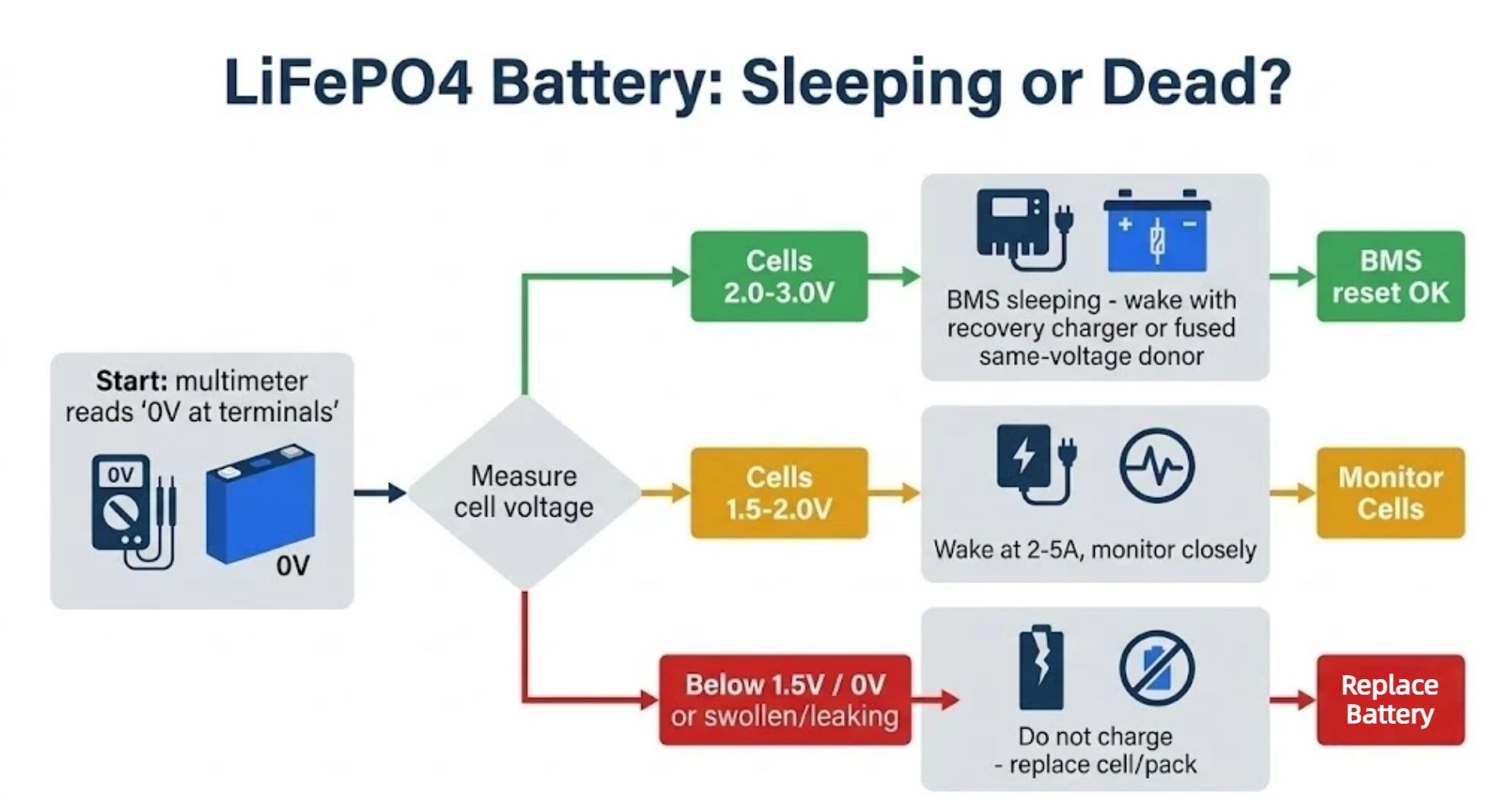
Never force current into the pack before checking its condition. Start at the output terminals, then read individual cell voltage through the balance taps or BMS app if you can do so safely.
| Reading per cell | Likely state | Action |
|---|---|---|
| Terminals 0V; cells 2.0–3.0V | BMS sleep; cells are usually recoverable. | Proceed with the wake-up procedure. |
| Cells 2.5–3.2V; terminals low | Deep discharge with the BMS disconnected. | Wake the pack, then charge slowly. |
| Cells about 1.5–2.0V | Borderline condition; possible cell damage. | Use very low current and monitor closely. |
| Any cell below about 1.5V or true 0V | Likely permanent damage. | Do not force charge; replace the cell or pack. |
| Swelling, leak, crack, or burning smell | Physical damage. | Stop, isolate, and seek qualified support. |
Safety note: Never use a car starting battery, ordinary jump pack, or unregulated high-current power supply to wake a lithium battery. Never connect different nominal voltages, and never attach a booster directly to bare cells unless the battery manufacturer specifically instructs you to do so.
What You Need to Wake the Battery
| Item | Why it matters |
|---|---|
| LiFePO4 charger with 0V wake-up, boost, or recovery mode | The preferred tool; it can supply a small conditioning current even when the terminals initially read 0V. |
| Digital multimeter, DC range | Confirms terminal and cell voltage before and during recovery. |
| Fully charged LiFePO4 donor battery of the same voltage | Raises terminal voltage if the charger cannot start at 0V. |
| Jumper lead with an in-line 10–15A fuse | Limits inrush current when batteries are briefly paralleled. |
| Current-limited bench power supply, optional | A professional-only alternative, capped at 2–5A and connected to the output terminals only. |
| BMS app or smart monitor | Reads per-cell voltage and helps confirm when the charge path re-enables. |
How to Wake Up a LiFePO4 Battery: Step by Step
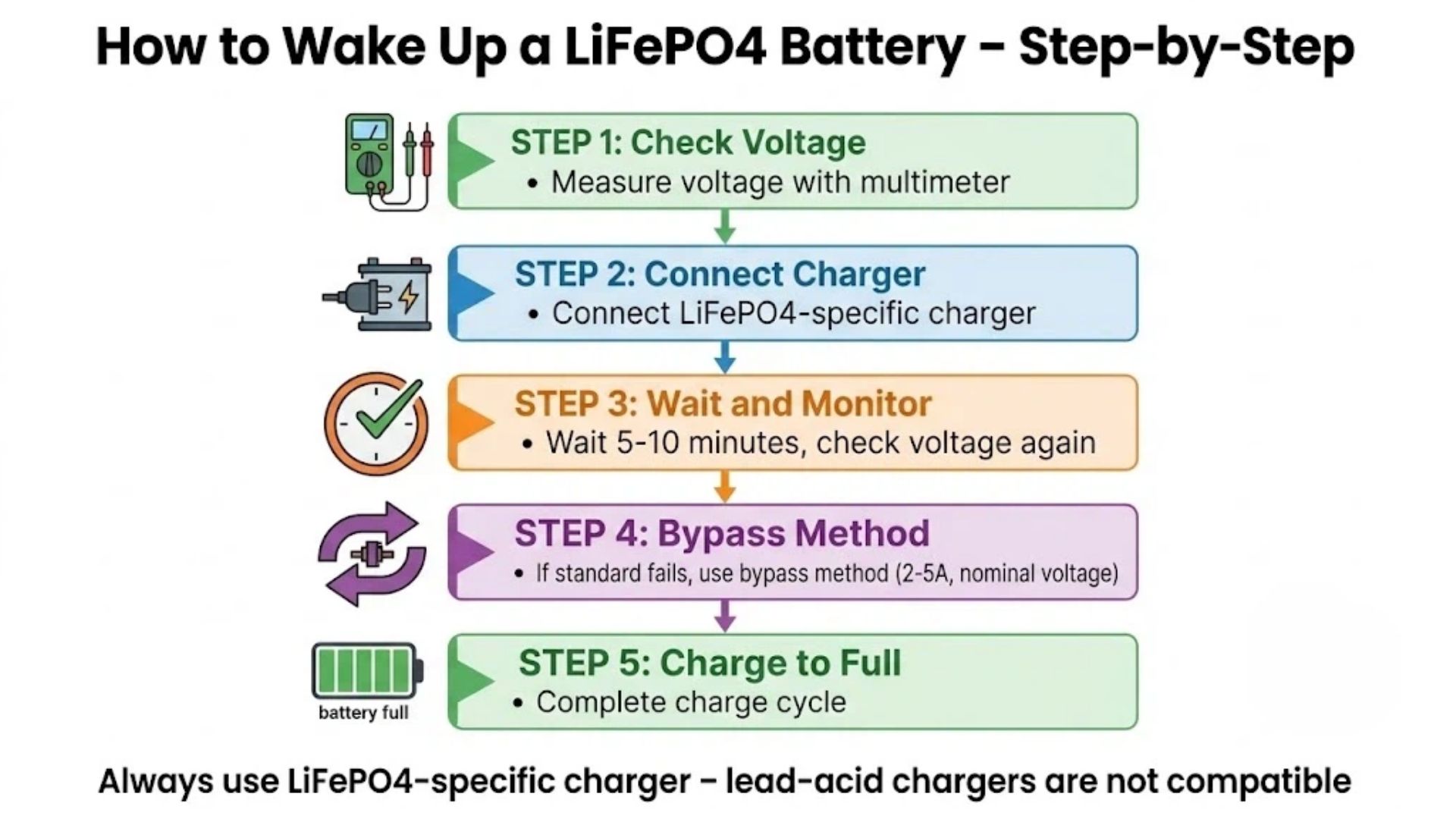
- Disconnect all loads and inspect the pack. Turn off the inverter or DC switch, remove standby loads, and check for swelling, leakage, damaged cables, or overheating. Do not continue if physical damage is present.
- Measure terminal and cell voltage. A 0V terminal reading with cells at 2.0–3.0V usually indicates BMS sleep. Cells below about 1.5V require a different decision and should not be force-charged.
- Connect the LiFePO4 recovery charger. Confirm polarity, connect the battery first, then apply AC power. Use the charger's wake-up, boost, recovery, or 0V activation setting if available.
- Wait and monitor. Leave the charger connected for 10–30 minutes. A pack that has sat at 0V for months may take several hours before normal charging begins. Watch for current, rising voltage, and temperature.
- Use a fused boost only if the charger refuses 0V. Briefly connect a same-voltage LiFePO4 donor through a 10–15A fuse for 5–10 minutes, then disconnect it and reconnect the proper charger.
- Charge fully and balance. Once normal charging starts, charge to 100% and hold the constant-voltage stage so the BMS can balance the cells. Recharge at a modest 5–10A initially if current control is available.
If the charger still cannot detect the battery after the first waiting period, do not repeatedly plug and unplug it. Move to the controlled boost options below.
Charger Won't Recognize 0V? Boost and Safe Jumper Methods
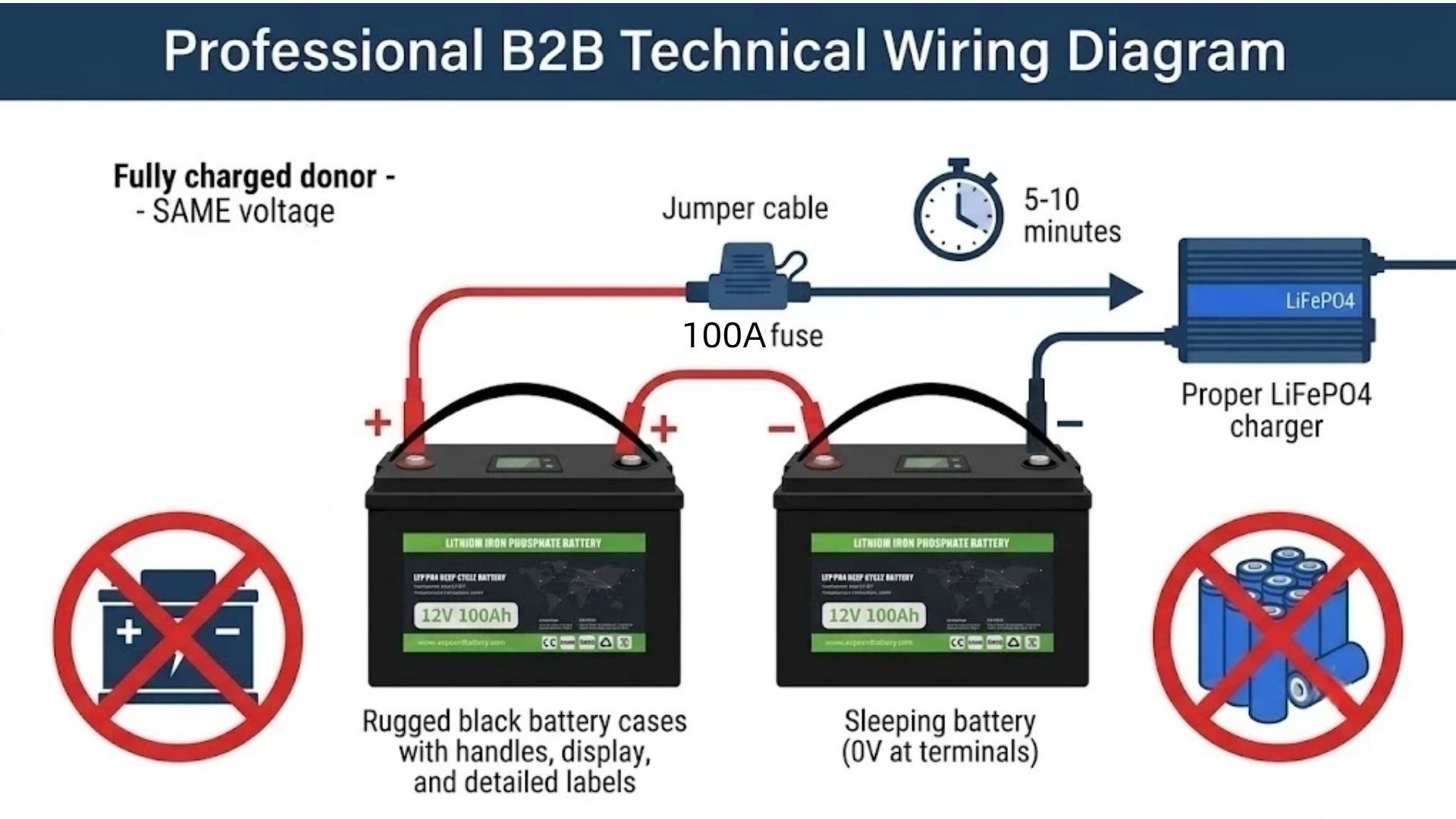
Method A: Fused same-voltage LiFePO4 donor, recommended
- Choose a fully charged LiFePO4 battery with the same nominal voltage: 12V to 12V, 24V to 24V, or 48V to 48V.
- Connect positive to positive and negative to negative at the output terminals. Place a 10–15A fuse in line on the positive jumper.
- Leave the connection in place for 5–10 minutes while monitoring voltage and temperature.
- Disconnect the donor, immediately connect the proper LiFePO4 charger, and charge at a low current until the pack stabilizes.
Method B: Charger force-charge or recovery mode
Some LiFePO4 chargers and inverter-chargers include a force charge, boost, activation, or recovery setting. Follow the manufacturer's instructions, remain with the battery during the activation period, and return to the normal LiFePO4 charge profile as soon as current begins.
Method C: Current-limited bench power supply, professionals only
Set the supply to the correct LiFePO4 charge voltage and cap current at 2–5A. Connect only to the battery output terminals, not directly to bare cells, for 5–10 minutes until the BMS detects voltage and closes. Then move immediately to the proper LiFePO4 charger. Stop if voltage does not rise, the pack becomes warm, or any fault appears.
Do not use a lead-acid car battery, mismatched voltage, ordinary jump starter, or unrestricted power supply. These can produce uncontrolled inrush current and may damage the BMS or create a fire risk.
Wake-Up for 12V, 24V, and 48V Systems
| System | Configuration | Nominal voltage | Full charge | Approximate BMS cut-off |
|---|---|---|---|---|
| 12V | 4S | 12.8V | 14.6V | About 10V |
| 24V | 8S | 25.6V | 29.2V | About 20V |
| 48V / 51.2V | 16S | 51.2V | 58.4V | About 40V |
For a single 12V or 24V drop-in battery, the steps above apply directly. For multi-module 48V server-rack and solar systems, verify each module before reconnecting the rack. If one module is deeply discharged while neighboring modules are full, paralleling the modules can create a large inrush event. Use the rack monitor or master BMS to verify each module as it recovers.
After It Wakes: Charge, Balance, and Recalibrate
- Charge to 100% and hold the constant-voltage stage so the BMS can passive-balance the string. Healthy cells should settle close to one another.
- Check per-cell voltage in the BMS app. A cell that repeatedly lags after balancing may be weak or failing.
- Run one controlled cycle if SOC remains inaccurate: charge to 100%, discharge to roughly 20%, then recharge.
- Use the correct LiFePO4 profile with full-charge voltages of 14.6V, 29.2V, or 58.4V for 12V, 24V, and 48V systems.
For detailed passive and active balancing procedures, see our How to Balance LiFePO4 Batteries guide. For charge settings, see the LiFePO4 charging guide.
How to Stop Your Battery Going to Sleep
| Measure | Why it helps |
|---|---|
| Set a low-voltage disconnect | Removes loads at the manufacturer's threshold before the BMS has to lock out. |
| Eliminate parasitic loads | Prevents standby monitors, inverters, or alarms from slowly draining the pack. |
| Store at 50–60% SOC | Reduces storage stress and avoids leaving the pack empty. |
| Top up every 3–6 months | Counters self-discharge during long storage and keeps cells above the cut-off. |
| Check voltage monthly | Catches a drifting pack before it reaches under-voltage lockout. |
| Keep a recovery charger available | Makes recovery straightforward if a pack does enter sleep mode. |
For long-storage procedures, review the LiFePO4 Battery Storage and Maintenance guide.
Wake-Up Didn't Work? Troubleshooting vs Hardware Failure
If the pack still will not take charge, separate a sleeping BMS from other causes before concluding the cells have failed.
- Charger profile: confirm the charger is designed for LiFePO4 and uses the correct voltage.
- Connections: inspect fuses, breakers, terminals, polarity, and loose wiring.
- Temperature: LiFePO4 charging should not begin below 0°C; warm the pack according to the manufacturer's guidance.
- Fault lockout: a short, over-current, or communication fault may require a BMS reset rather than a wake-up.
- Hardware condition: swelling, overheating, repeated fault codes, or voltage collapse after charging indicates a more serious problem.
For non-BMS charging causes, see the LiFePO4 battery not charging troubleshooting guide.
For latched faults, use the BMS reset guide.
Related Resources
- How to Reset a BMS on a LiFePO4 Battery — reset methods, fault codes, and 48V rack procedures.
- What Is a LiFePO4 BMS? — BMS functions, parameters, and selection guidance.
- LiFePO4 Battery Not Charging? — charger, fuse, wiring, and temperature causes.
- How to Balance LiFePO4 Batteries — balancing after recovery.
- LiFePO4 Battery Safety Guide — safe handling and damaged-pack decisions.
Frequently Asked Questions
How do you wake up a sleeping LiFePO4 battery?
Disconnect all loads, connect a LiFePO4-specific charger with a 0V wake-up or boost mode, and leave it connected for 10–30 minutes until the BMS closes the charge path. If the charger cannot output at 0V, briefly raise the terminal voltage with a same-voltage LiFePO4 donor connected through a 10–15A fuse, then remove the donor and charge normally.
How do you charge a lithium battery that is completely dead?
First measure cell voltage. If the cells read about 2.0–3.0V, use a recovery charger or a fused same-voltage LiFePO4 donor to wake the BMS, then charge at a low current. If a cell is below about 1.5V, reads true 0V, or the pack is swollen or hot, do not force charge it.
Can a LiFePO4 battery that reads 0V be revived?
Often yes. A 0V reading at the output terminals with healthy cell voltage usually means the BMS has disconnected the pack, not that the cells are permanently dead. Recovery depends on cell condition, how long the pack was discharged, temperature, and whether it accepts a controlled charge.
Why will my LiFePO4 charger not detect the battery?
When the charge MOSFET is open, the charger may see 0V at its terminals and refuse to start. A charger with wake-up, boost, or recovery mode can overcome this. Without that feature, use a fused same-voltage LiFePO4 donor just long enough for the BMS to close the charge path.
How long does it take to wake a LiFePO4 BMS?
A recovery charger often takes 10–30 minutes, while a fused donor method may take 5–10 minutes. A pack that has sat at 0V for months can take several hours before normal charging begins. Once current starts, allow the normal charge cycle to finish.
Can I jump-start a LiFePO4 battery with another battery?
Only with a fully charged LiFePO4 battery of the same nominal voltage, connected at the output terminals through a 10–15A fuse for 5–10 minutes. Do not use a car battery, ordinary jump pack, mismatched voltage, unregulated power supply, or a direct connection to bare cells.
What is the low-voltage cut-off for 12V, 24V, and 48V LiFePO4 systems?
At roughly 2.5V per cell, the BMS cuts discharge: about 10V for 12V, 20V for 24V, and 40V for 48V. Nominal voltages are 12.8V, 25.6V, and 51.2V, while full-charge voltages are 14.6V, 29.2V, and 58.4V.
Do I need a special charger to wake a LiFePO4 battery?
A LiFePO4-specific charger is always required because the voltage profile differs from lead-acid. Choosing one with 0V wake-up, boost, or recovery mode makes a sleeping pack easier to revive. A lead-acid charger should not be used.
Is it safe to revive a deeply discharged LiFePO4 battery?
A controlled wake-up is routine when cells read about 2.0–3.0V and the pack is not damaged. Stop recovery if any cell is below about 1.5V, the pack will not accept current, voltage collapses after charging, or the battery swells, leaks, smells, or becomes hot.
Why is the SOC percentage wrong after wake-up?
A deep discharge interrupts the BMS coulomb-counting process, so SOC may jump or read inaccurately after recovery. Charge to 100%, hold the constant-voltage stage, then run one controlled discharge and recharge cycle. Persistent errors may indicate a weak or imbalanced cell.
Why does my LiFePO4 battery keep going to sleep?
Repeated sleep usually points to a parasitic load, missing low-voltage disconnect, long storage without recharge, mismatched charging, or one weak cell. Set the proper disconnect threshold, isolate standby loads, store at 50–60% SOC, and check voltage monthly.
What if the battery still will not charge after it wakes?
If the terminals show voltage but charging still fails, check the charger profile, fuse, breaker, wiring, polarity, and temperature. A short, over-current, or communication fault may require a BMS reset rather than another wake-up attempt.
Summary
- A 0V LiFePO4 pack is often in BMS under-voltage sleep rather than permanently failed.
- Always inspect the pack and measure cell voltage before applying a boost.
- The preferred recovery method is a LiFePO4 charger with 0V wake-up or recovery mode.
- If the charger refuses 0V, use a same-voltage LiFePO4 donor through a 10–15A fuse for 5–10 minutes.
- Never use a car battery, mismatched voltage, ordinary jump pack, or unregulated power supply.
- Finish with a full charge, balancing, and one controlled cycle if SOC needs recalibration.
- Prevent recurrence by removing parasitic loads, using a low-voltage disconnect, and maintaining storage SOC.
Get In Touch
Ready to source LiFePO4 batteries for your project? Contact Enerbe today.
📄 Request a Technical Datasheet
Contact Us →📞 Speak with Our Engineering Team
Get In Touch →🔗 Browse Our Custom Battery Solutions
View Products →Dongguan A&S Power Technology Co., Limited.
Building 1, No. 2, Keji 9th Road,
Songshan Lake, Dongguan, Guangdong, China📞 +86 137 1383 1631
✉ info@aspowerbattery.com
Stay Charged. Stay Connected.